
Facebook Ads Library
Search every Facebook ad running right now — plus Instagram, TikTok, YouTube, Google, and LinkedIn. Performance data. Historical archive. One search.

Sections
Search the Facebook Ads Library — Plus 7 More Platforms
The official Facebook Ads Library only covers Meta platforms. AdLibrary.com lets you search Facebook ads alongside TikTok, YouTube, Google, LinkedIn, and more — with performance data and saved collections.
Our Ads Library Pages
What Is the Facebook Ads Library?

How to Search the Facebook Ads Library
The Facebook Ads Library (officially renamed the Meta Ad Library in 2021) is a free, public database of every ad currently running on Facebook, Instagram, Messenger, and the Audience Network. Meta launched it in March 2019 after the Cambridge Analytica scandal forced the company to increase advertising transparency. Initially limited to political ads, it was expanded later that year to include all commercial ads globally.
Anyone can access it without a Facebook account or login. It serves two purposes: political transparency (giving the public and journalists visibility into ad spending) and competitive intelligence (letting marketers see what brands are running). The URL is still facebook.com/ads/library despite the Meta rebrand.
3 Ways to Access the Facebook Ads Library
- Direct URL — Go to facebook.com/ads/library in any browser. Select your country from the dropdown, choose 'All ads' for commercial advertising (or 'Issues, elections, or politics' for political ads with spend data), and type a brand name or keyword into the search bar.
- From a Facebook Page — Visit any business's Facebook Page, scroll to the 'Page Transparency' section in the sidebar, and click 'See all' next to 'Ads from this Page.' This takes you directly to that advertiser's active ads in the library — useful when you're already looking at a competitor's Page.
- From an ad in your feed — When you see a Facebook or Instagram ad, tap the three dots (⋯) menu, select 'Why am I seeing this ad?', then click 'Learn more about this advertiser.' This links to their Ad Library listing so you can see everything else they're running.
Search Tips Most People Miss
The Facebook Ads Library supports search operators and filters that most marketers never use:
- Exact phrase matching: Wrap phrases in quotes to find ads with specific wording. Searching "free trial" only returns ads containing that exact phrase — not ads that happen to mention 'free' and 'trial' separately.
- OR operator: Use the pipe symbol (|) to search for alternatives. Searching nike|adidas returns ads mentioning either brand. Useful for scanning an entire competitive set at once.
- Sort by start date: This is the most underused feature. Sorting oldest-first reveals long-running ads — the ones that have been active for weeks or months. Since advertisers don't keep paying for ads that don't convert, longevity is the best free proxy for performance.
- Platform filter: After searching, filter to see only Facebook ads, only Instagram ads, only Messenger, or only Audience Network. This reveals how brands adapt their creative between platforms — many run completely different ads on Facebook vs. Instagram.
- Media type filter: Narrow to video-only, image-only, or meme ads. Useful for studying specific creative formats or finding trends in how competitors use video vs. static.
- Language filter: See how brands localize their Facebook ads across markets. A brand might run aggressive discount messaging in one country and premium positioning in another.
What Data Is Available
For every active commercial ad, the Facebook Ads Library shows: the ad creative (image, video, or carousel), primary text (the main ad copy), headline, description, call-to-action button text, the advertiser's Facebook Page name, which platforms the ad runs on (Facebook, Instagram, Messenger, Audience Network), the start date when the ad began running, its current status (active or inactive), and any A/B test variations if the brand is testing multiple versions of the same ad. Once you spot a creative worth emulating, you can quickly recreate the style with a free meme maker.
For political and social-issue ads, you also get: estimated spending range (e.g., '$1,000–$5,000'), estimated impressions range, demographic breakdown by age and gender, geographic distribution showing where impressions were delivered, and the funding entity ('Paid for by...' disclosures). Political ads are archived for 7 years regardless of whether they're still running.
In the EU and UK, the Digital Services Act requires additional transparency: targeting parameters (how the advertiser chose who sees the ad), demographic reach breakdown (who actually saw it), beneficiary and payer information, and 1-year data retention after the last impression. This means EU researchers get significantly more useful data from the Facebook Ads Library than those in other regions.
What Data Is NOT Available
This is where the Facebook Ads Library falls short for professional marketers:
- No impressions, reach, clicks, CTR, or conversion data for commercial ads
- No spend or budget information for commercial ads
- No audience targeting details — you can't see who the ad targets
- No landing page or destination URL
- No historical archive — commercial ads disappear immediately when paused or stopped
- No way to save ads, create collections, tag favorites, or export data
- No cross-platform data — TikTok, YouTube, Google, LinkedIn, X are all missing
- No alerts or monitoring — you can't get notified when competitors launch new ads
- No API access for commercial ads (only political/EU ads via the Meta Ad Library API)
What AdLibrary.com Adds to the Facebook Ads Library
Every ad, one feed
Browse ads like a social feed. See platform, impressions, runtime, and creative — at a glance.

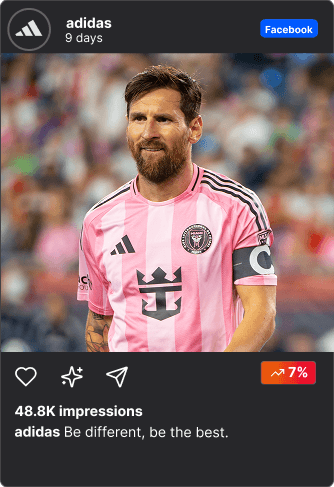


All platforms. One search.
Meta, Google, TikTok, YouTube, X, LinkedIn, Snapchat, Pinterest — search them all from a single search bar.
Research that pays for itself
Teams using ad library find winning creatives faster and stop wasting budget on guesswork. Typical results after 3 months of using adlibrary.com:
0x
ROAS
-0%
Ad spend
Save. Tag. Reuse.
Build your swipe file. Organize winning ads into folders and never lose a reference again. (You can even share with non-users, like your clients)
Why the Facebook Ads Library Alone Isn't Enough
The Facebook Ads Library covers one ecosystem out of many. In 2025, brands run ads across Facebook, Instagram, TikTok, YouTube, Google Search, Google Display, LinkedIn, X (Twitter), Snapchat, Pinterest, and mobile ad networks. Checking each platform's transparency tool separately means toggling between completely different interfaces with different filters, different data, and no way to compare cross-platform.
Even within Facebook, the Ads Library gives you zero signal on what's actually performing. You can see that a brand is running 47 ads, but you have no idea which ones are driving results and which are being tested or forgotten. The only workaround is the longevity proxy — ads running for months are likely working — but that's a rough approximation, not real data.
And the moment an ad gets paused, it's gone forever. If you didn't screenshot it, you can't reference it. There's no way to build a competitive intelligence archive, track how a brand evolves their creative over time, or share findings with your team in any structured way.
That's the gap AdLibrary.com fills. One search across 7+ platforms. Estimated impression data. Full historical archive. Saved collections with tags and team sharing. Advanced filters for format, country, date, and performance. And a REST API for programmatic access.
How AdLibrary.com Extends the Facebook Ads Library
7 Ways to Use Facebook Ads Library Data
- Reverse-engineer winning Facebook ads. Sort the Facebook Ads Library by start date (oldest first) to find long-running ads. Any ad that's been active for 30, 60, or 90+ days is almost certainly profitable — advertisers don't keep paying for what doesn't convert. Study the hook (first line of copy), the offer structure, the visual format, and the CTA. Look for patterns across multiple winning ads from the same brand.
- Map a competitor's full Facebook ad strategy. Search a competitor's Facebook Page name to see every ad they're currently running. Count how many active campaigns they have, identify their primary messaging angles, note which platforms they use (Facebook vs. Instagram vs. both), and check how many A/B test variations they run per ad. This reveals their creative testing velocity and strategic priorities.
- Compare Facebook vs. Instagram creative approaches. Filter by platform after searching a brand. Many companies run completely different creative on Facebook vs. Instagram — different aspect ratios, different copy lengths, different hooks. Understanding how top brands adapt between platforms helps you tailor your own creative per placement rather than running the same ad everywhere.
- Find untapped opportunities in your market. If competitors in your niche only run static image ads on Facebook, there's an opportunity in video. If they only target the US, European or APAC markets might be wide open. If nobody is running carousel ads, that format might perform well precisely because it's uncommon in your space. Gaps in the competitive landscape are where ROI lives.
- Build a seasonal campaign playbook. Research what top advertisers in your industry run during Black Friday, Cyber Monday, Q4 holiday season, back-to-school, Valentine's Day, and other key periods. Document the creative formats, messaging angles, discount structures, and timing. Use these proven patterns to plan your own campaign calendar months in advance.
- Discover influencer and creator partnerships. Search for branded content in the Facebook Ads Library to find 'paid partnership' posts. This reveals which influencers and creators brands are investing in for Facebook and Instagram campaigns, what creative formats they use for sponsored content, and how they integrate product messaging into creator-style ads.
- Validate ad copy and positioning before launch. Before launching a new Facebook campaign, entering a new market, or positioning a new product, research how competitors frame their offers in their ads. Analyze their pricing mentions, unique selling propositions, social proof elements (reviews, stats, testimonials), and objection handling. This intelligence helps you differentiate rather than compete head-on with identical messaging.
Our Facebook Ads Database — and Beyond
200M+ Google ads
largest database online from Google Ads Transparency Center (incl. YouTube)


50M+ Meta ads
Facebook, Instagram & Threads from the Meta Ad Library


Mobile and Gaming ads
We also have a big native network for checking mobile and native gaming ads and advertorials
Tiktok, X and Pinterest Ads
For absolute Gen Z social media capture


Constantly thriving to be the best
We are constantly improving our platform to give you all the results and actionable insights. We already had Linkedin integrated and will bring it back and Snapchat will be integrated soon. And we will be the first to integrate ChatGPT ads as soon as they release.


Built for Teams Who Need More Than the Facebook Ads Library
Facebook Ads Library: one platform, no performance data, no historical archive, no saved collections, no API for commercial ads. Good for a quick check of what a competitor is running right now on Facebook.
AdLibrary.com: 200M+ ads across 7+ platforms (including 50M+ Facebook and Instagram ads), estimated impression data, full historical archive where paused ads are preserved, team collaboration with collections and tags, REST API for programmatic access, and AI-powered creative analysis that breaks down hooks, angles, and audience triggers.
5 Common Mistakes When Researching Facebook Ads
- Only looking at the first ad version. Brands frequently A/B test 5-10 variations of the same ad with different headlines, images, or CTAs. If you only see the first one, you miss what they're actually optimizing. Scroll through all variations to understand their testing strategy and see which elements they consider worth testing.
- Ignoring start dates. A Facebook ad that's been running for 3 months is telling you something completely different than one launched yesterday. The long-running ad is almost certainly profitable. The new one is just a test that may get killed in a week. Always check how long an ad has been active before drawing conclusions.
- Assuming every active ad is a winner. Not every running Facebook ad is profitable. Some are brand-new tests being evaluated, some are campaigns the team forgot to pause, and some are simply underperforming but haven't been reviewed yet. The real signal is longevity combined with multiple active variations — that indicates the advertiser is actively investing in and optimizing the campaign.
- Only researching Facebook. Your competitors almost certainly run ads on other platforms too — TikTok, YouTube, Google, LinkedIn. They may use completely different creative, messaging, and offers on each platform. Limiting your research to the Facebook Ads Library means missing the full competitive picture. Use AdLibrary.com to see everything in one search.
- Copying instead of learning. The goal of competitive research is to understand patterns — hook structures, offer framing, visual approaches, CTA strategies — not to duplicate what competitors do. Study the underlying frameworks, then create original work adapted to your brand, audience, and positioning.
Related Guides & Resources
Looking to search Facebook ads right now? Go to our Facebook Ad Library search tool.
Facebook & Meta Advertising
- Facebook Ad Library API: Complete Guide — Authentication, rate limits, limitations, and better API alternatives.
- How to Analyze Facebook Ads — Framework for breaking down Facebook ad creative, copy, and performance.
- Facebook Ads for Beginners — Complete getting-started guide for new Facebook advertisers.
- How to Optimize Facebook Ads — Proven techniques for improving Facebook ad performance.
- How to Scale Facebook Ads — Scale without losing performance or breaking your account.
- How to Test Facebook Ads — Creative testing strategies and the 2026 framework.
- Meta Ad Benchmarks by Industry — CPC, CTR, and CPM benchmarks to contextualize your research.
- Meta Ad Library Guide — Our complete guide to the Meta Ad Library (parent of the Facebook Ads Library).
Other Platform Ad Libraries
- Instagram Ad Library Guide — Search and analyze Instagram ads.
- TikTok Ad Library & API — TikTok Creative Center limitations and alternatives.
- Google Ads Transparency Center — Google Search, Display, and YouTube ads.
- YouTube Ads Library Guide — Competitor video ad research.
- LinkedIn Ad Library Guide — B2B competitor ads on LinkedIn.
Competitive Intelligence
- How to Spy on Competitor Ads — Complete cross-platform competitive intelligence guide.
- How to Find Winning Ads — Framework for identifying high-performing ad creative.
- How to Build a Swipe File — Turn ad research into a reusable creative library.
- Competitor Ad Analysis Guide — Full framework for analyzing rival campaigns.
Compare Tools
- AdLibrary vs Meta Ad Library — Feature-by-feature comparison.
- Best Facebook Ad Library Alternatives — Top tools for cross-platform ad research.
- Best Meta Ad Library Alternatives — Complete alternatives roundup.
- Best Ad Spy API — API comparison for programmatic access.
What our customers say
“Found a competitor's entire funnel in 2 minutes. New campaign launched same day.”
Media Buyer , running $500k/month
Ready to Search Beyond the Facebook Ads Library?
Try the best Facebook ad library alternative
Facebook Ads Library — Frequently Asked Questions
What is the Facebook Ads Library?
The Facebook Ads Library (now officially called the Meta Ad Library) is a free, public database of every ad currently running on Facebook, Instagram, Messenger, and the Audience Network. Meta launched it in March 2019 after pressure to increase political ad transparency. It now includes all commercial ads globally and is accessible at facebook.com/ads/library without a login or Facebook account.
How do I search the Facebook Ads Library?
Go to facebook.com/ads/library, select your country from the dropdown, choose 'All ads' for commercial advertising, and type a brand name or keyword into the search bar. Use quotes for exact phrase matching ("free trial"), the pipe operator (|) for OR searches (nike|adidas), and filter by platform, media type, language, and date after searching. Sort by start date to find long-running winners.
Can I see how much competitors spend on Facebook ads?
Only for political and social-issue ads, where Meta shows estimated spending ranges (e.g., '$1,000–$5,000'). For regular commercial ads, no spend, budget, or performance data is available. The best free proxy is ad longevity — ads running for weeks or months are typically profitable. For more methods, see our guide on how to track competitor ad spend.
How long do Facebook ads stay in the library?
Commercial ads are visible only while actively running — the moment an advertiser pauses or stops an ad, it disappears from the library completely. Political and social-issue ads are archived for 7 years regardless of status. In the EU and UK, the Digital Services Act requires all ads to be retained for 1 year after their last impression. For historical Facebook ad research, AdLibrary.com maintains a permanent archive.
Does the Facebook Ads Library show Instagram ads?
Yes. The Facebook Ads Library includes ads from all Meta platforms: Facebook, Instagram, Messenger, Threads, and the Audience Network. You can filter by specific platform after searching. For a dedicated Instagram guide, see our Instagram Ad Library guide.
Is there a Facebook Ads Library API?
Meta offers an API called the Ad Library API, but it has significant limitations: it only covers political and social-issue ads globally, plus all ad types in the EU and UK (due to DSA requirements). It requires Facebook Developer credentials, app review approval, and has strict rate limits. There is no API access for commercial ads outside the EU/UK. For programmatic access to commercial Facebook ad data across 7+ platforms, see our Facebook Ad Library API guide or use the AdLibrary API.
What are the best Facebook Ads Library alternatives?
Full comparison: Best Facebook Ad Library Alternatives (2026). The top picks are AdLibrary.com (most comprehensive: 7+ platforms, 200M+ ads, performance data, historical archive, API), BigSpy (large database but cluttered interface), Minea (e-commerce focused), and Foreplay (creative saving for agencies). AdLibrary.com is the only tool that combines multi-platform search, estimated performance data, saved collections, and API access in one platform.
Why is the Facebook Ads Library not working?
The most common issues and fixes: (1) Disable ad blockers — they interfere with Meta's scripts and can prevent the library from loading. (2) Clear your browser cache and cookies. (3) Disable VPN or privacy extensions that might block Meta's domains. (4) Try using Chrome, which works best with Meta's tools. (5) Check if Meta is experiencing downtime (you can verify at metastatus.com). If a specific brand shows no ads, they've likely paused all their campaigns.
What's the difference between Facebook Ads Library and Meta Ad Library?
Same tool, rebranded. When Facebook renamed itself to Meta in October 2021, the Facebook Ad Library became the Meta Ad Library. The URL is still facebook.com/ads/library and the functionality is identical. See our Meta Ad Library guide for the full breakdown.